
Saturday, 4 Apr 2026

Current affairs publication that encourages citizens’ journalism

Explore Now
Townpress Newspaper
  • News
  • Africa
  • World
  • Opinions
  • Sports
  • Lifestyle
  • People
  • Motoring
  • Podcast
My News
  • ANC
  • Cyril Ramaphosa
  • eskom
  • facebook
  • twitter
  • SAPS
  • President Cyril Ramaphosa
  • Gauteng
  • DA
  • Nigeria
Townpress NewspaperTownpress Newspaper
Font ResizerAa
  • News
  • Africa
  • World
  • Opinions
  • Sports
  • Lifestyle
  • People
  • Motoring
  • Podcast
Search
  • News
  • Africa
  • World
  • Opinions
  • Sports
  • Lifestyle
  • People
  • Motoring
  • Podcast
Have an existing account? Sign In
Follow US
© 2014 - 2026 Townpress Newspaper, South Africa - Townpress logo & associated media rights are the intellectual property of Townpress Newspaper. All Rights Reserved.
CommunityPublic StatementTechnology

Berost Randsomeware Attackers hit South Africa

David A Patrcks
Last updated: May 8, 2019 10:06 am
By
David A Patrcks
May 8, 2019
Share
6 Min Read
SHARE

Johannesburg – Over the past 48 hours, .berost virus has been the topic in the digital space. South Africa became the latest target 24 hours ago with a number of big corporations data getting infected. In the history of ransomware, .berost is the worst and those who have been victims of the virus can testify to that statement.

Digital data is one of the most valuable resources nowadays and, naturally, it is also one of the most common targets for computer hackers.

One of the most infamous examples of a mass threat that targets the files inside the users’ computers are the representatives of the Ransomware cryptovirus category, with one of their latest representatives being the malicious .Berost.

Unlike other malicious types of software, a typical cryptovirus wouldn’t really try to damage the computer’s system itself, nor would it seek to spy on the user or acquire some sensitive personal information and then threaten to make it public. Instead, what a Ransomware cryptovirus does is it locks up all user files found on the computer using a complex data encryption process for the purpose.

Once your files have been locked you will see a _readme text document with the information of the attacker as well as a ransom demand to get your files back.

In addition to this, the .berost ransomware could also infect your computer by having the infection files uploaded on suspicious sites. The infection files could pretend to be cracks, patches and other forms of activators.

Clicks removes TRESemme products after backlash over ad
“HHP found power in vernacular”
Zimbabwe braces for the worst as bond notes introduced
Corruption hotline results in R340m recovered

Contact MI Specialist to help Decrypt and restore ransomware infected files here


Infection Triggers:

If you receive a file, try downloading a document, visit a site and you get numerous automatic open tabs with a slow machine. Unplug the internet immediately and go through the steps that would help you recover your files. There are currently a 0.1% chance in the market at the current moment that files infected by .berost can be decrypted but we ran a test and can confidently confirm 100% files recovery.

- Advertisement -
Ad image

Cleaning

1: Preparations

Note: Before you go any further, we advise you to bookmark this page or have it open on a separate device such as your smartphone or another PC. Some of the steps might require you to exit your browser on this PC.

2: Task Manager

Press Ctrl + Shift + Esc to enter the Task Manager. Go to the Tab labeled Processes (Details for Win 8/10). Carefully look through the list of processes that are currently active on you PC.

If any of them seems shady, consumes too much RAM/CPU or has some strange description or no description at all, right-click on it, select Open File Location and delete everything there.
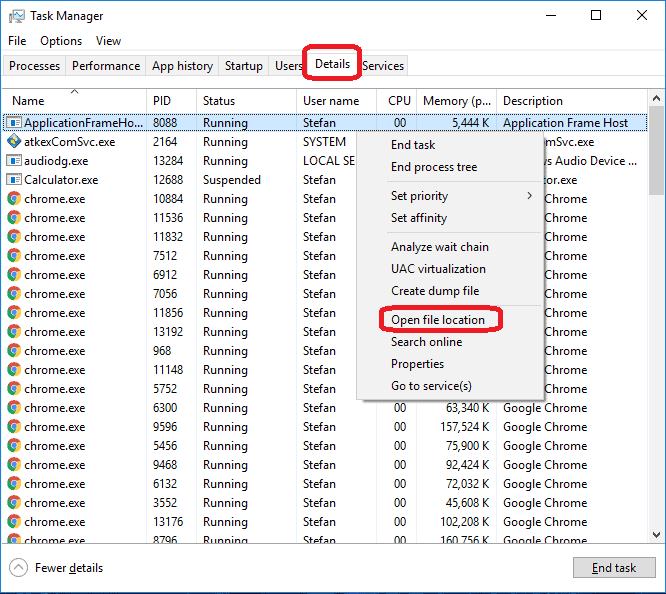
Also, even if you do not delete the files, be sure to stop the process by right-clicking on it and selecting End Process.

3: IP related to .Berost

Go to c:\windows\system32\drivers\etc\hosts. Open the hosts file with notepad.

Find where it says Localhost and take a look below that.
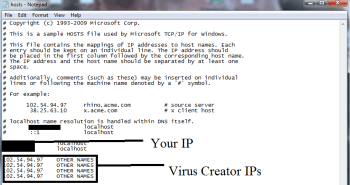
hosts_opt (1)

If you see any IP addresses there (below Localhost) send them to us here, in the comments since they might be coming from the .Berost.

4: Disable Startup programs

Re-open the Start Menu and type msconfig.

Click on the first search result. In the next window, go to the Startup tab. If you are on Win 10,  it will send you to the Startup part of the task manager instead, as in the picture:
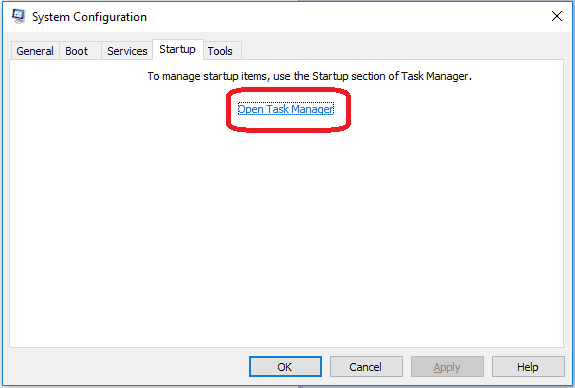
If you see any sketchy/shady looking entries in the list with an unknown manufacturer or a manufacturer name that looks suspicious as there could be a link between them and .Berost , disable those programs and select OK.

5: Registry Editor

Press Windows key + R and in the resulting window type regedit.

Now, press Ctrl + F and type the name of the virus.

Delete everything that gets found. If you are not sure about whether to delete something, do not hesitate to ask us in the comments. Keep in mind that if you delete the wrong thing, you might cause all sorts of issues to your PC.

6: Deleting potentially malicious data – .Berost

Type each of the following locations in the Windows search box and hit enter to open the locations:

%AppData%

%LocalAppData%

%ProgramData%

%WinDir%

%Temp%

Delete everything you see in Temp linked to .Berost Ransomware. About the other folders, sort their contents by date and delete only the most recent entries. As always, if you are not sure about something, write to us in the comment section.

7: .Berost Decryption

The previous steps were all aimed at removing the .Berost Ransomware from your PC. However, in order to regain access to your files, you will also need to decrypt them or restore them. Download Michael Gillespie decrypter here.


.Berost SUMMARY:

Name
Berost

Type 
Ransomware

Danger Level 
High (.Berost Ransomware encrypts all types of files)

Symptoms
.Berost Ransomware is hard to detect and aside from increased use of RAM and CPU, there would barely be any other visible red flags.

Distribution Method 
Most of the time, Trojans get distributed through spam e-mails and social network messages, malicious ads, shady and pirated downloads, questionable torrents and other similar methods.



 

Facebook Comments

.
  • Iran Assures South Africa of Safe Passage Through Strait of Hormuz
  • One Twin Dies After Groundbreaking Separation Surgery in Limpopo
  • Jacob Zuma Slams Leak Amid Appeal Over Khampepe Recusal
  • Planned Water Outages to Affect Multiple Areas Next Week
TAGGED:Berosthackermaphorisa InitiativesRandsomewarevirus
Share This Article
Email Copy Link Print
ByDavid A Patrcks
David A Patricks is an African business developer for over 36 companies in Africa. He is currently operating in the city of Pretoria in South Africa. He is an astounding Public Relations Strategist, an insightful Speaker, Facilitator, writer and a computer expert.
Previous Article Khoi leadership wants ANC voted out of office
Next Article Safety of IEC officials a priority at Ebongweni C-Max prison
Leave a Comment

Leave a Reply Cancel reply

You must be logged in to post a comment.

Newsletter Subscription

Subscribe to our newsletter to get our newest articles instantly!

    FacebookLike
    XFollow
    YoutubeSubscribe
    MediumFollow
    RSS FeedFollow

    Top News

    World

    Iran Assures South Africa of Safe Passage Through Strait of Hormuz

    April 3, 2026
    Health

    One Twin Dies After Groundbreaking Separation Surgery in Limpopo

    April 3, 2026
    Politics

    Jacob Zuma Slams Leak Amid Appeal Over Khampepe Recusal

    April 3, 2026
    notices

    Planned Water Outages to Affect Multiple Areas Next Week

    April 3, 2026
    Top News
    Police appeal for help to find missing couple
    Community
    Illicit Alcohol Under Scrutiny as Compliance Checks Intensify
    Community
    Henke Pistorius Breaks Silence on Son’s Character and New Venture
    Right now
    Three Bodies, One Grave: Ncumisa Selani’s Secret Murders Shocked Pretoria
    Community
    Private School Shock: King David Victory Park Closure Resurfaces in 2026
    Community
    Reality TV Star Mel Viljoen Claims She Acted Alone In US Retail Theft Case
    Trending

    You May also Like

    Community

    DA plans to introduce Private Member’s Bill for national debt

    May 22, 2018
    Community

    Mopani District denies awarding tenders unlawfully

    March 29, 2018
    Community

    Activists urge SA to intensify calls for release of fees must fall protestors

    August 28, 2018
    Community

    Treasury submits its Nkandla report to court

    June 28, 2016
    Show More
    • More News:
    • ANC
    • Cyril Ramaphosa
    • eskom
    • facebook
    • twitter
    • SAPS
    • President Cyril Ramaphosa
    • Gauteng
    • DA
    • Nigeria
    • Johannesburg
    • South Africa
    • zimbabwe
    • jacob zuma
    • EFF
    • Covid-19
    • KwaZulu-Natal
    • State capture
    • cape town
    • Hawks
    Townpress Newspaper

    Indigenous Newspaper created to embolden the township ideals of sharing information and connecting people to grassroots content locally and around the world. We believe communal stories are relevant, so we created the platform to tell the stories of real south africans, people you know.

    Facebook X-twitter Linkedin Youtube Medium Rss

    About Company

    • Contact Us
    • Advertise with US
    • Privacy Policy – T&C
    • Cookie Policy
    • Comments Policy
    • Submit a Tip
    Subscribe Now for Real-time Updates on the Latest Stories!
    © 2014 - 2026 Townpress Newspaper, South Africa - Townpress logo & associated media rights are the intellectual property of Townpress Newspaper. All Rights Reserved
    Manage Cookie Consent
    To provide the best experiences, we use technologies like cookies to store and/or access device information. Consenting to these technologies will allow us to process data such as browsing behavior or unique IDs on this site. Not consenting or withdrawing consent, may adversely affect certain features and functions.
    Functional Always active
    The technical storage or access is strictly necessary for the legitimate purpose of enabling the use of a specific service explicitly requested by the subscriber or user, or for the sole purpose of carrying out the transmission of a communication over an electronic communications network.
    Preferences
    The technical storage or access is necessary for the legitimate purpose of storing preferences that are not requested by the subscriber or user.
    Statistics
    The technical storage or access that is used exclusively for statistical purposes. The technical storage or access that is used exclusively for anonymous statistical purposes. Without a subpoena, voluntary compliance on the part of your Internet Service Provider, or additional records from a third party, information stored or retrieved for this purpose alone cannot usually be used to identify you.
    Marketing
    The technical storage or access is required to create user profiles to send advertising, or to track the user on a website or across several websites for similar marketing purposes.
    • Manage options
    • Manage services
    • Manage {vendor_count} vendors
    • Read more about these purposes
    View preferences
    • {title}
    • {title}
    • {title}
    Welcome to Townpress
    Username or Email Address
    Password

    Lost your password?